


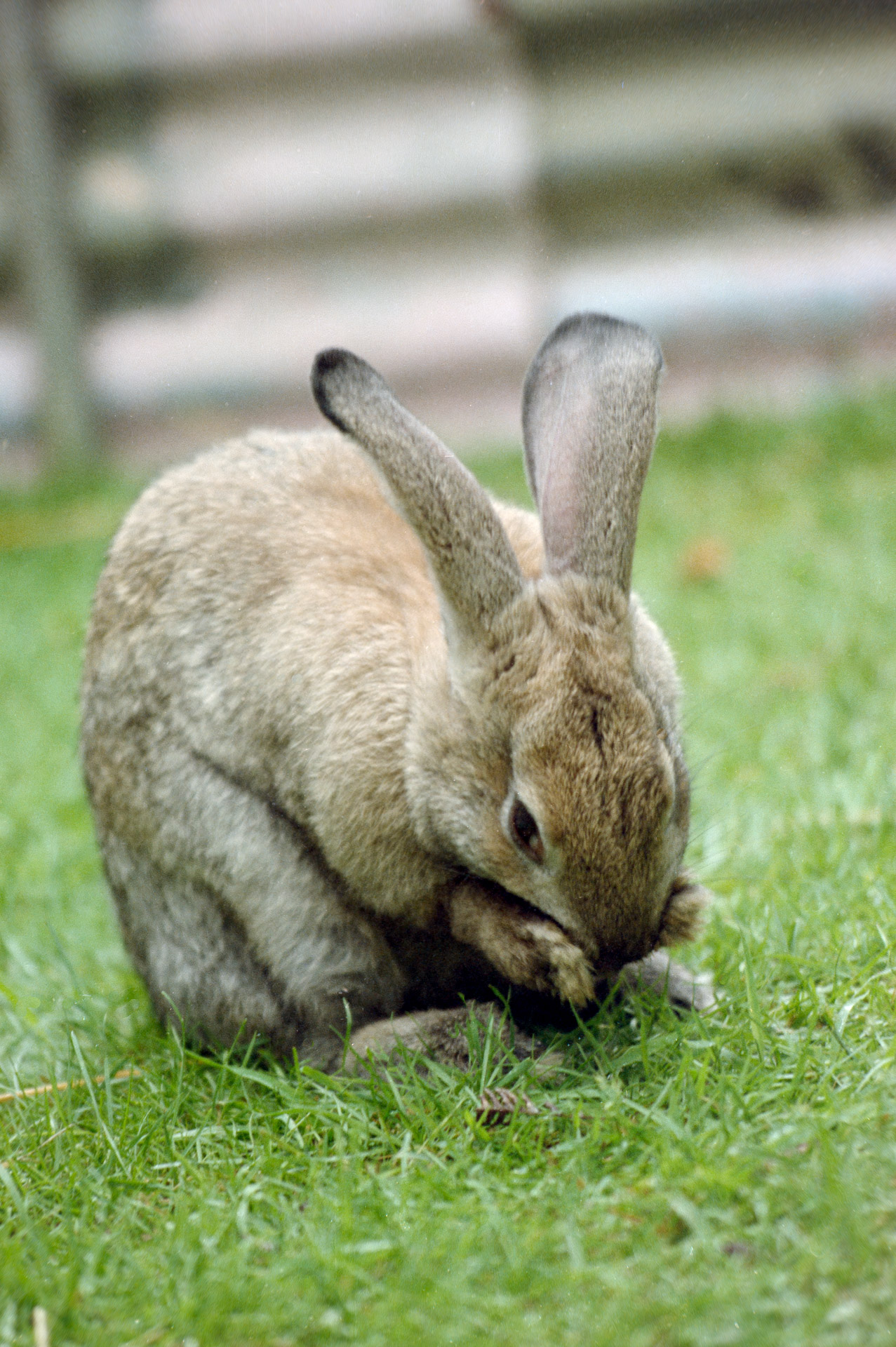
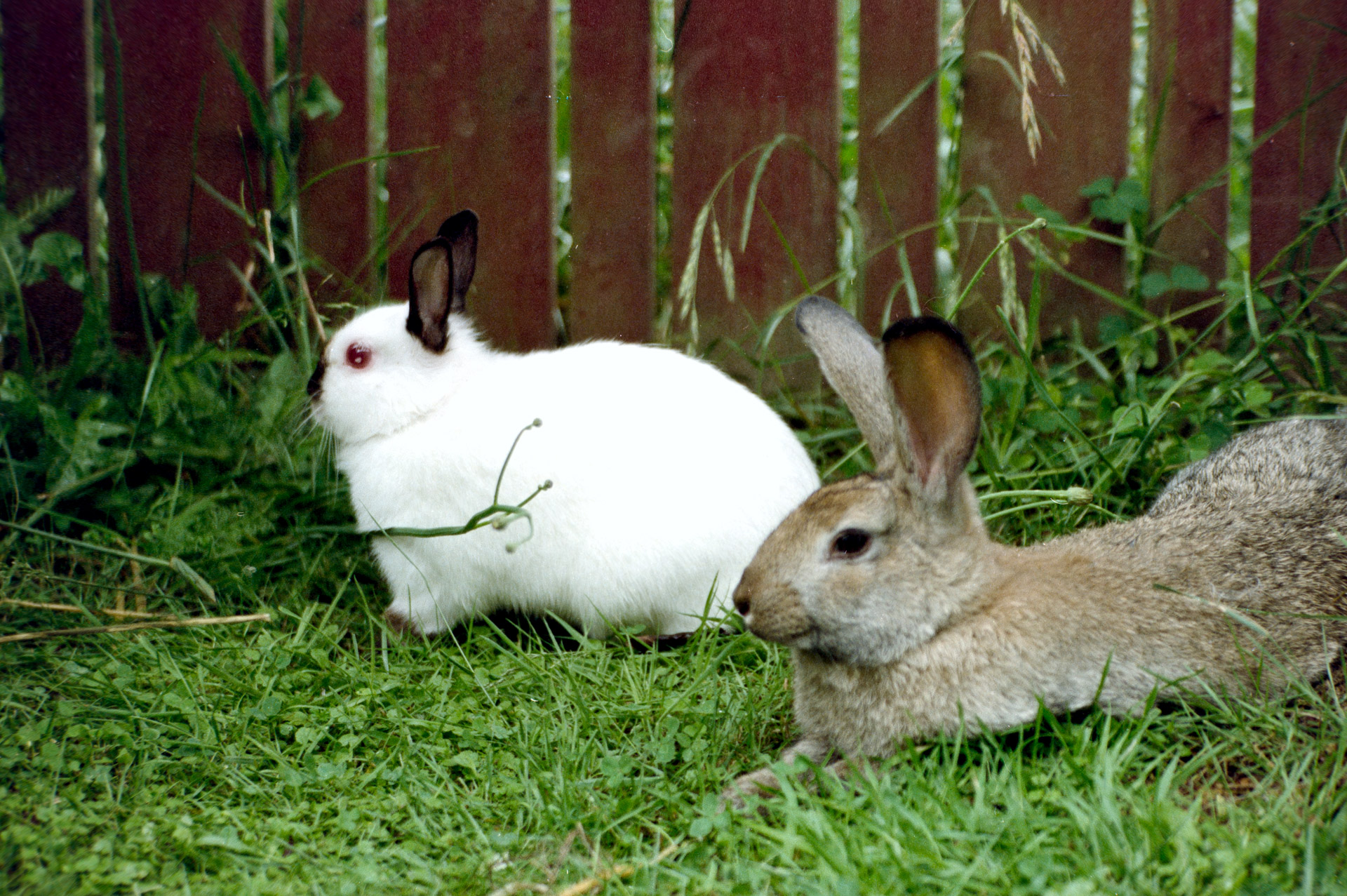
Original image shot with a Nikon FA on film around 1990.
Digitising Your Old Film Negatives
You can take several different approaches when digitising film negatives. Using dedicated scanners, DSLR scanning rigs, specialist software, custom colour profiles, diffusion materials, copy stands and anti-Newton glass all tend to dominate the conversation quickly.
My own process is much simpler than all that, and despite the simplicity, I think my approach is not only cost effective and time efficient but also produces great results in the end.
I photograph my negatives using a mirrorless camera (my Nikon Z8), a macro lens and a constant LED light source, then process everything directly in Adobe Camera Raw. No specialist inversion software, no scanner, and no complex profiling workflow. Just a controlled capture setup and a repeatable processing method.
The interesting thing is that once the workflow becomes stable, film digitisation starts behaving much more like ordinary RAW photography than you might expect.
My Capture Setup
I set my camera up suspended from an inverted tripod centre column, sitting on my desk. Rather than mounting the camera conventionally above the tripod, I reverse the centre column, so the camera hangs downward over the film and light source below and ensure that the CCD is as close to parallel to the desk as possible.
This arrangement gives me a surprisingly precise way to control magnification and framing.
I use the Nikon Nikkor Z MC 105mm f/2.8 VR S macro lens, or a vintage (1973) 55mm Micro-Nikkor.
I carefully manage the height of the tripod column and the focus of my lens to achieve a point where I have the magnification just right. That depends on what format of negatives I am copying because I have both 35mm film and 60x45mm format images in 120 film.
Once I get close to the framing I want using the tripod column, I then fine tune focus using the lens for accuracy.
This creates a stable workflow than constantly chasing focus and magnification together through the focus ring alone. Macro lenses alter framing noticeably as focus distance changes, so separating coarse positioning from fine focus adjustment helps maintain consistency from frame to frame.
Why a Macro Lens is important
I’ll tackle this question this way: the problem with not using a macro lens is that their fields of focus are curved. This causes the edges of the film to be out of focus should I focus on the centre of the negative. Or the centre to be out of focus should I focus on the edges.
You could partly overcome that by using a small aperture to maximise depth of field, but in my experience that still doesn’t do the trick.
Macro lenses have a flat field of focus and therefore allow me to focus on the whole negative as a flat surface despite the corners of the negative being further away from the lens, and that in turn changes the need from using maximal depth of field like with f/32, to instead setting an aperture like f/5.6 of f/8 which are more likely to give me the sharpest results.
The Light Source
The negatives are illuminated using a dedicated LED negative light panel with stable constant output. It’s a relatively low-cost item: Kaiser Slimlite Plano, designed for viewing negatives.
One thing I intentionally avoid is placing the film directly against the surface of the panel. Instead, I suspend the negative slightly above it.
At macro magnifications, even tiny imperfections on a diffuser surface can become visible repeatedly across multiple frames. Dust particles, scratches, subtle texture in the diffuser material, and even LED structure underneath can all begin appearing in captures if the film is too close.
By lifting the film away from the light source slightly, several things improve simultaneously:
- dust on the panel becomes defocused
- diffusion appears smoother
- the LED structure becomes less defined
- Newton ring risks are reduce
- illumination uniformity improves
This matters more than many people realise because modern macro lenses resolve extraordinary detail. Once you begin working at this level of sharpness, every flaw in the optical path becomes visible somewhere.
White Balance and Exposure
I’m probably not shooting WB the way you think I might.
One of the more interesting discoveries in my workflow involved white balance.
My light source itself is approximately 5000K, which is generally considered a sensible daylight-balanced illumination for negative digitisation. But I do not shoot at 5000K white balance.
Instead, I purposefully shoot at approximately 3000K, not matching the colour temperature of the source.
That sounds counterintuitive initially, but the reason is entirely practical.
Colour negative film contains a strong orange mask. When photographed neutrally at 5000K, the RAW channels can become heavily unbalanced before inversion even begins. Typically, the blue channel ends up relatively weak while red and green channels dominate. In some cases, parts of the RGB data can already be approaching clipping.
By intentionally setting a much cooler white balance during capture, the channel distribution becomes more centred and manageable. The RGB curves behave more evenly later during inversion, and there is less risk of pushing weaker channels aggressively during processing.
This is not about making the preview image look correct in-camera. It is about improving the mathematical behaviour of the RAW data during inversion and colour correction later.
Once I discovered this, the entire inversion process became noticeably cleaner and more controllable.
Camera Raw Processing
After capture, everything is processed directly in Adobe Camera Raw.
I start with basic cleanup first:
- crop
- rotation
Only after that do I invert the image.
The inversion itself is performed using the Tone Curve.
The simplest approach is to invert the combined RGB curve by swapping black and white points, effectively converting the negative into a positive image. From there, individual RGB channels are adjusted independently to rebalance colour.
This stage usually determines whether the final image feels natural or difficult.
Film negatives rarely invert cleanly with a single perfect curve. Different film stocks behave differently, and older negatives can drift considerably over time. Shadows and highlights often need different channel corrections, particularly when colour crossover appears.
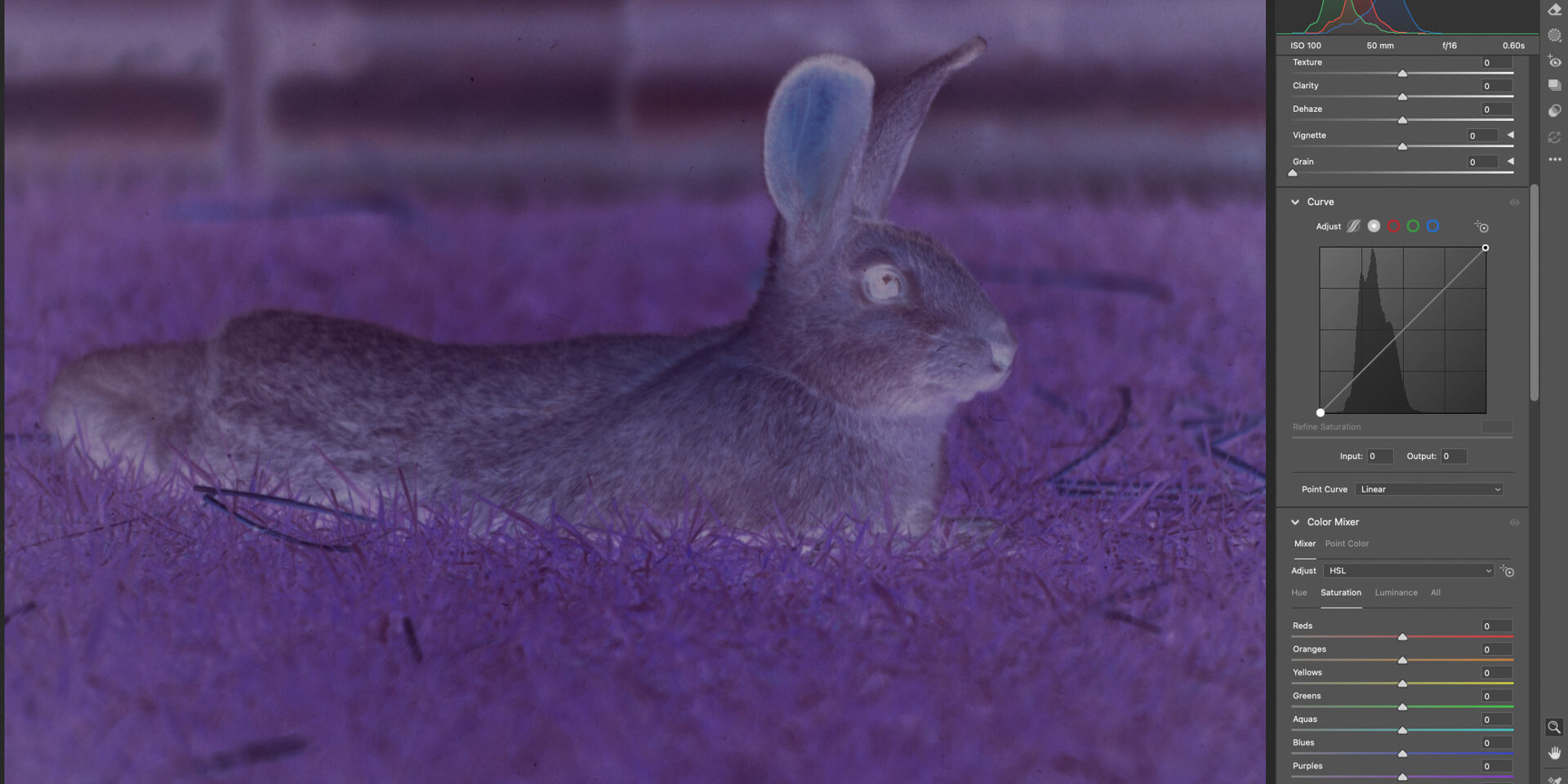
So while managing tonal range in the RGB curves, I carefully check for the head and toe of the curve in the histogram – the noticeable ends of the tonal distribution in each separate channel R, G and B that represent clean whites and black blacks. I adjust each white point or black point to meet with the toe or the head, right up until I start clipping, and then ease it back slightly. Refer to the screenshots.
I’ve found this to be an especially effective way to manage tonal adjustment, and at this point I have an image that is just about spot on in terms of colour.
Initial swap of black point and white point.
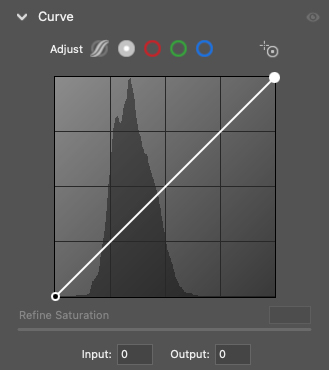
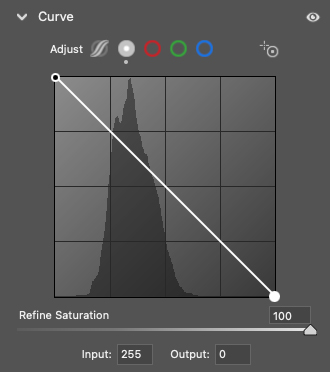
This simple process inverts the “negative” into a “positive” and you should have something that looks more natural already.
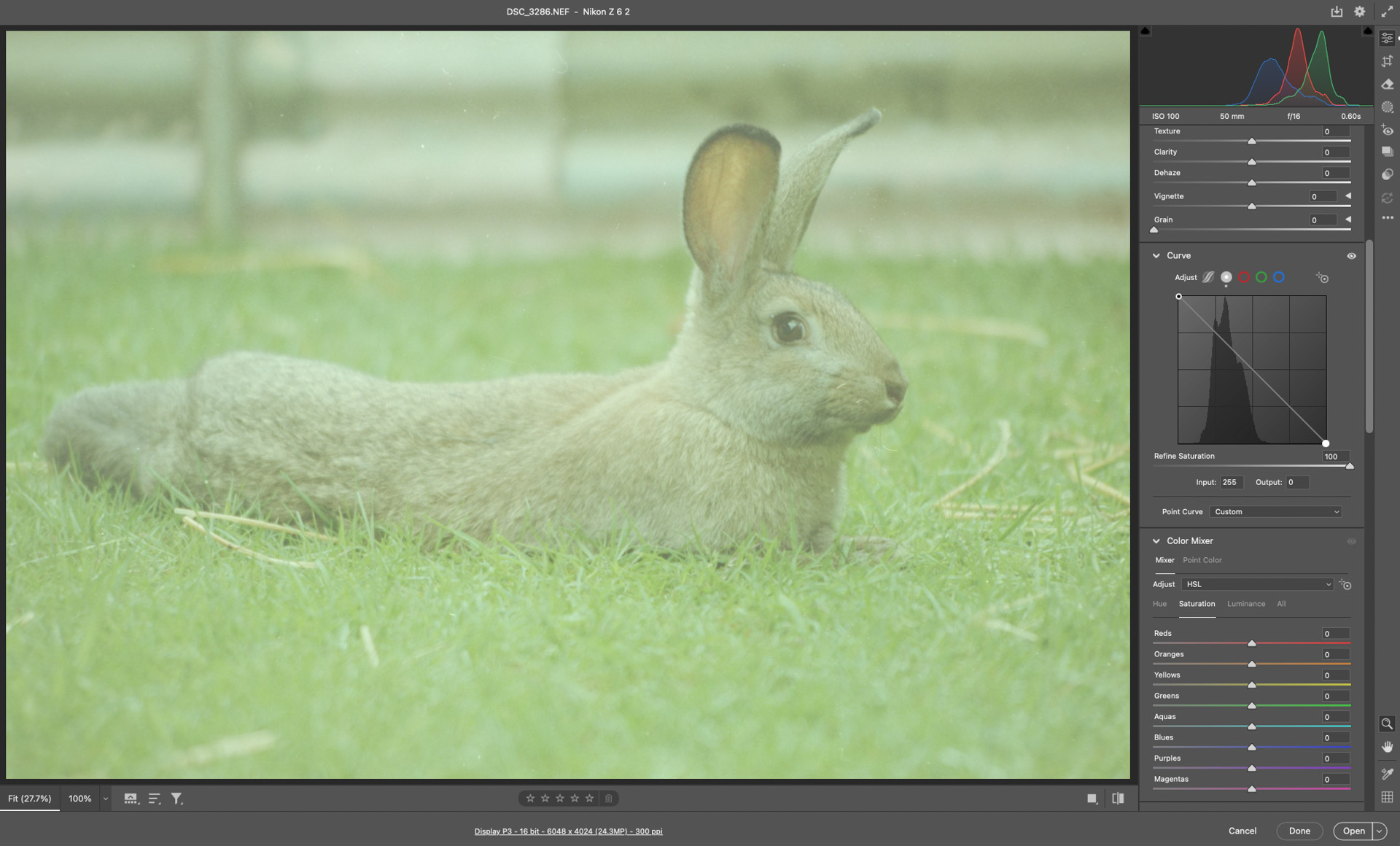
Now adjust the Red, Green and Blue Curves black point and white point just within the limit where the Histogram avoids clipping. pay attention to the clipping highlights in the top corners of the historgram.
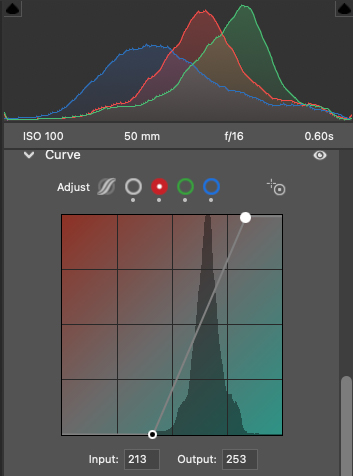
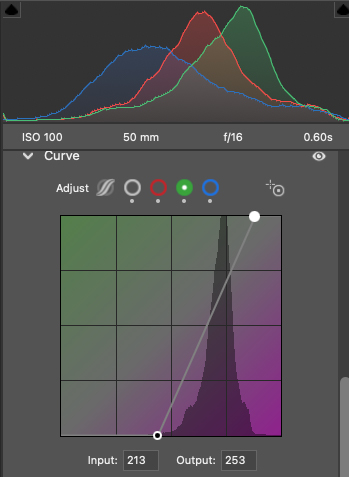
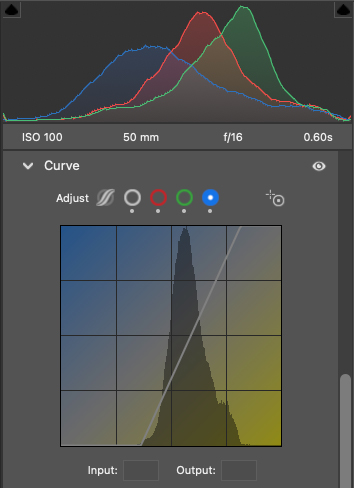
After just these few steps, here is the result. Make fine adjustments as needed.
Beware! Standard Exposure adjustments don’t behave as expected because the curves are all inverted, so trying to slide exposure to lighter makes the image darker.
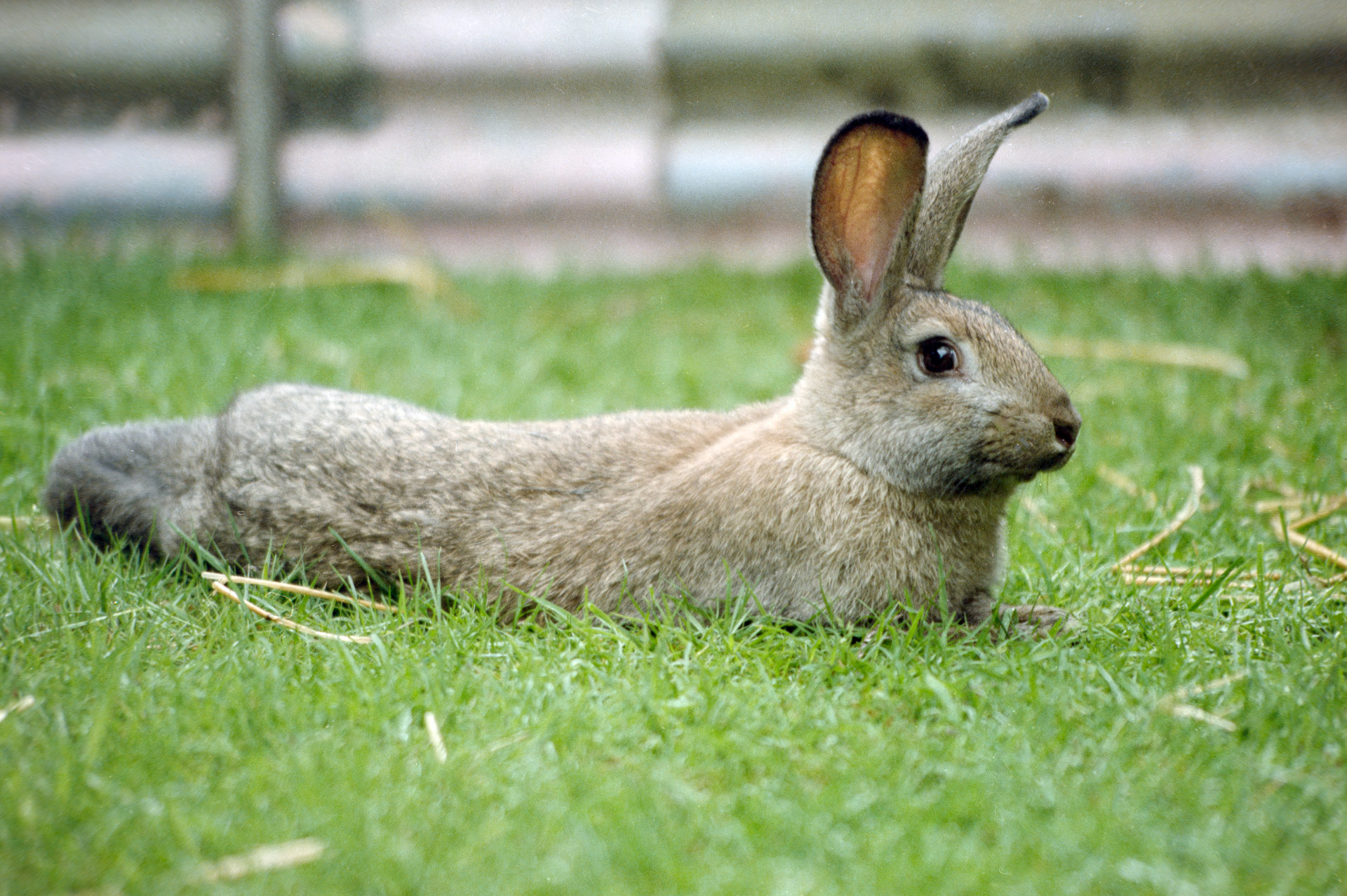
An important step to save time
Before I move into more traditional RAW processing, I will usually copy the RAW adjustments done so far and paste them across the entire roll of film. This is because most images in a single roll, assuming I shot them all on the same settings when digitising, have more of less the same tonal distribution. That’s not true for another film, even of the same stock and age, so limit this application to one and the same “roll”.
Two more images where I applied a simple “copy and paste” of the RAW adjustments from the first image I processed, made no further Expsure adjustments, and only performed some dust removal. These two shots were on the same roll of film so had the same tonal range.
Further Processing
- exposure balancing
- minor black and white point refinement if needed
- contrast shaping
- subtle colour balance adjustment
- noise management (if you want)
- sharpening (sparingly)
Interestingly, negative inversion behaves much like heavy colour grading. Small corrections early in the workflow often produce much cleaner results than large aggressive corrections later. But adjustment of Exposure setting are now all inverted and counterintuitive.
I use denaoise and sharpening sparingly in this case. Remember, your image is limited by how sharp the original was, and the apparent noise is most likely to be film grain. So long as you ensured your digitisation capture was sharp, I would avoid trying to correct for something that existed in the original because it will probably only create artifacts.
If sharpening is pushed too hard after inversion, film grain and colour noise become unpleasant very quickly. I prefer to keep sharpening conservative and controlled.
Consistency Matters More Than Complexity
One of the things I like most about this process is that it is highly repeatable.
- The camera position remains stable.
- The light source remains stable.
- The white balance remains stable.
- The processing workflow remains stable.
That consistency means that once a workflow is behaving well for a particular film stock, the rest of the roll often falls into place with relatively small adjustments.
There is a tendency online to make film digitisation appear extremely technical and equipment heavy. Certainly, very advanced workflows exist. But in practice, most image quality comes from a few simple fundamentals:
- stable geometry
- flat film
- good diffusion
- controlled exposure
- careful colour handling
- restrained processing
Everything else is refinement layered on top.
At the end of the process, what matters most to me is not whether the workflow resembles a laboratory scanner, but whether the final image retains the feel of the original film while still behaving cleanly as a modern digital file.
Some Key Points
What is the best way to digitise film negatives at home?
Using a digital camera with a macro lens, a stable copy setup, and an even backlight produces higher detail and control than most flatbed or consumer film scanners.
How do you set exposure when photographing negatives?
Expose to maximise usable data without clipping, keeping RGB channels intact. A consistent light source and careful histogram review help maintain recoverable tonal information.
Why raise the film above the light source?
Lifting the negative slightly off the light panel reduces the visibility of dust and surface imperfections that would otherwise repeat across frames.
How do you convert a negative into a positive image?
Invert the image in post-processing, then correct colour balance and tonal curves. Fine adjustments to contrast and colour channels restore a natural-looking result.
What resolution and file format should be used for archiving?
Capture at full camera resolution in RAW for maximum flexibility, then export high-quality JPEGs for use. Retain RAW files for long-term archival and reprocessing.